Planlab's AI agent can turn project documents into a risk register, run quantitative schedule risk analysis (QSRA), and draft a report explaining what the results mean for your project. For planners preparing a risk assessment, that puts the source information, the schedule and the analysis tools within reach of the same agent.
Imagine the supplier revises its delivery estimate just as you are finishing the reporting pack. Your project manager wants to know what this means for handover. The agent can find the affected risk, update the agreed assumptions, rerun the analysis and write up the answer for your review. It is another step in the work we showed with AI time-location charts: giving an agent the tools to produce the planning deliverable.
Build the risk register from the project information
The agent can create risks as well as update them. It can read a contract, a project report or risk-workshop notes, then create entries in the register and assign them to the relevant work. The team still needs to agree the probabilities and impact estimates; where the source is incomplete, those are questions to resolve before relying on the forecast.
The register lives alongside the schedule. If you already maintain risks in Oracle Primavera Cloud, the register can come across with the schedule import. Keeping the source notes and the saved assessment in a project knowledge base also gives the next reviewer a way to check why an estimate was chosen and what changed since the previous assessment.
Cost estimates can be part of the input too. The agent can cost-load the schedule using your estimates, so QSRA can assess cost exposure alongside completion dates. The assessment can bring together P80 forecasts, other confidence levels and a risk report explaining the main drivers and proposed follow-up actions.
See what drives the completion forecast
Quantitative schedule risk analysis, or QSRA, models uncertainty in activity durations and risk events to estimate a range of possible completion dates and the likelihood of meeting a target.
Recorded at actual speed: six activities, four risks and five uncertain activity durations. Run the simulation, then hover individual risks to see their effect on the completion forecast.
The pre- and post-response curves show simulations using the register's before- and after-mitigation estimates. Your team supplies the changes in probability or impact expected from a response; the simulation calculates what those assumptions mean for completion. It does not infer a mitigation's effectiveness from its description.
Hovering an individual risk's tornado bar adds the forecasts with that risk removed. The other risks and duration uncertainty remain, so the forecast still spans a range of dates.
Give the agent the change and the question together
In the example below, supplier delay affects steelwork delivery. A single request covers the register change and the analysis needed to answer the handover question:
Update Supplier delay to 80% probability. Keep its pre-response delay at 10 / 16 / 22 working days and post-response delay at 2 / 4 / 7 days. Run QSRA for Handover using the current register and give me the pre- and post-response P80 dates.
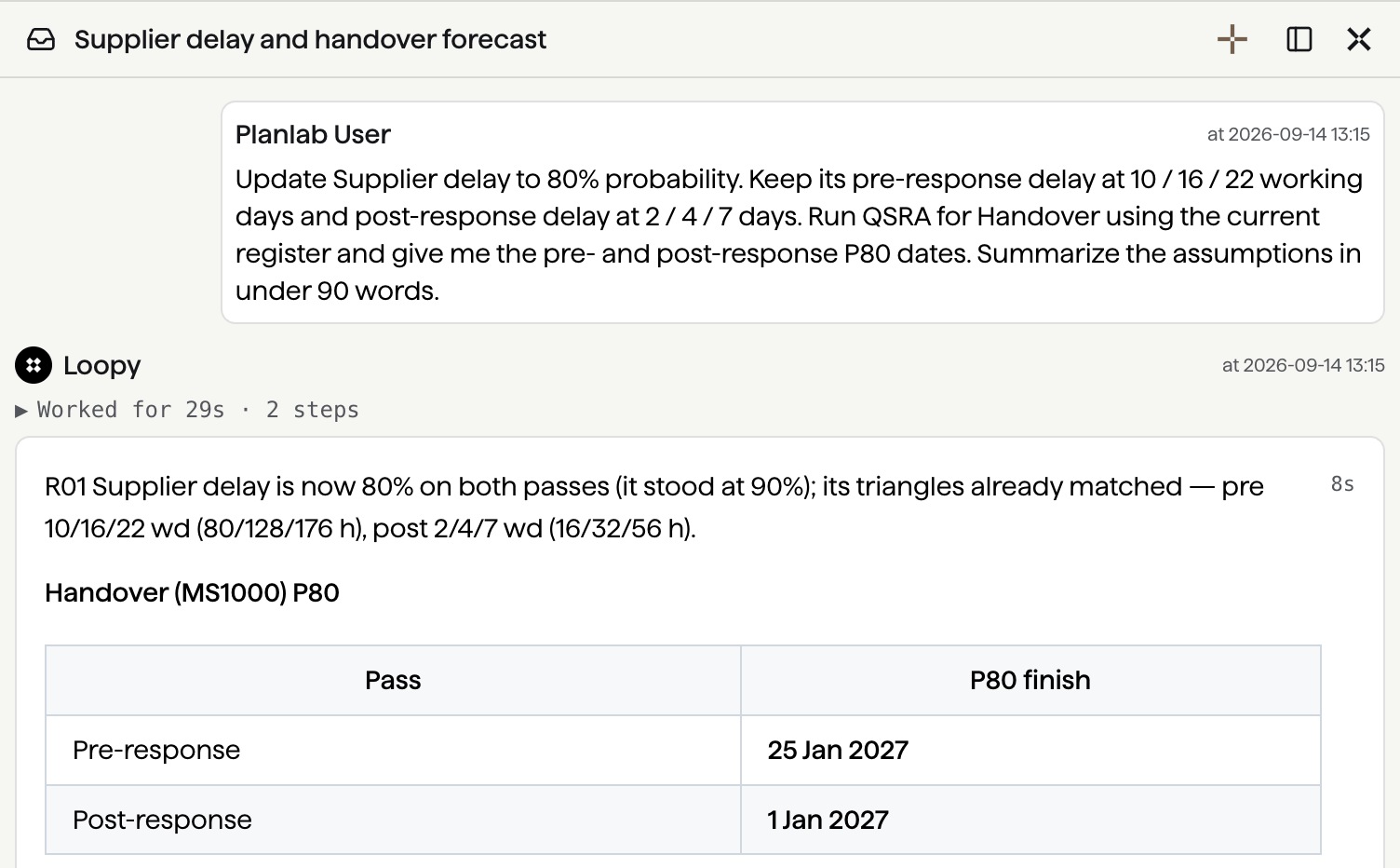
The agent updates supplier delay and returns pre- and post-response P80 dates. Select the image to view full size.
The agent makes the register edit and runs the simulation in the same conversation. You can inspect the changed inputs in the schedule's history and check the reported dates against the assumptions. P80 is the date by which 80% of the simulated outcomes finish.
A report that answers the project manager's question
The report can be written around the decision. For the supplier example, the useful commentary explains what changed, what it means for handover, and which assumptions still need checking with the supplier. The agent can draft that explanation from the run and the project information, including proposed follow-up actions for the team to review.
The conversation shown above asks for a short result summary. A fuller request can ask for a report for the project manager, with the source estimates and unresolved questions alongside the forecast. If an assumption changes during review, the agent can update the register, rerun the assessment and revise the report.
I would judge the workflow by how much of the assessment it completes: capturing the risks, calculating the forecast and explaining the result. That is also the test in our guide to evaluating AI scheduling software. Your project knowledge remains essential when reviewing the inputs and deciding what to do next.
Give the agent the changed information and the answer you need, then review the resulting assessment. Get in touch to try the workflow with Planlab.
The second post in this series, What Your QSRA Isn't Telling You, looks beyond P80 dates and tornado charts. It explains how to read the fat tail, identify the risk combinations behind the latest finishes, and check whether schedule buffers protect the work at risk.