Optimiser
Planlab's optimiser levels resources and compresses schedules to find the fastest and cheapest recovery options. Set the goal and constraints, and it searches the options and explains the best path forward.
Find the best path forward.
Resource levelling
Smooth resource peaks within your limits while protecting key dates.
Schedule compression
Find the cheapest way to recover time, by crashing, fast-tracking or re-sequencing work.
Explained trade-offs
See the time, cost and risk of each option, and push the chosen one back into the schedule.
How it works
1
Open the schedule you want to optimise.
2
Set the objective and constraints, such as a target date, resource limits or a cost ceiling.
3
The optimiser searches the options, ranks the best ones and explains the recommended path.
Solution deliveryNearly all the projects that we see have some kind of specific constraints, cost/time trade-offs, or something that is really hard to really model in P6. Finding the best schedule can be difficult, and even experienced planners will only be able to try a handful of different scenarios before producing what will become the master schedule.Planlab delivers a customised workflow to solve for your specific project. We can be as hands-on as needed, including providing a full planning service for your project.
We will work with you to:
Learn more about the two ways to work with Planlab- Define the rules of the project — what the real constraints are, and how they impact which schedules are feasible. This can be on anything: sequencing, resources, space, time, finances, or a combination of these
- Set the objective — what makes a schedule good? This can include time-based values (delay penalties / early delivery bonuses on milestones), costs, risk-levels, and more.
- Set up the decisions - what levers and options do you have? This often includes allocating shifts, additional working time, or resource levels, but can also include changing build sequences and other factors.
- Deliver you the right schedule — the first answer is almost always not the right one. We can help you iterate on the rules, set up additional scenarios, and configure the workflow to get the schedule that is best for you.
Case studiesWe run benchmarks on academic problem sets, and while useful they don’t tell the whole picture. Real projects are messy and complex, and these are the results that matter.
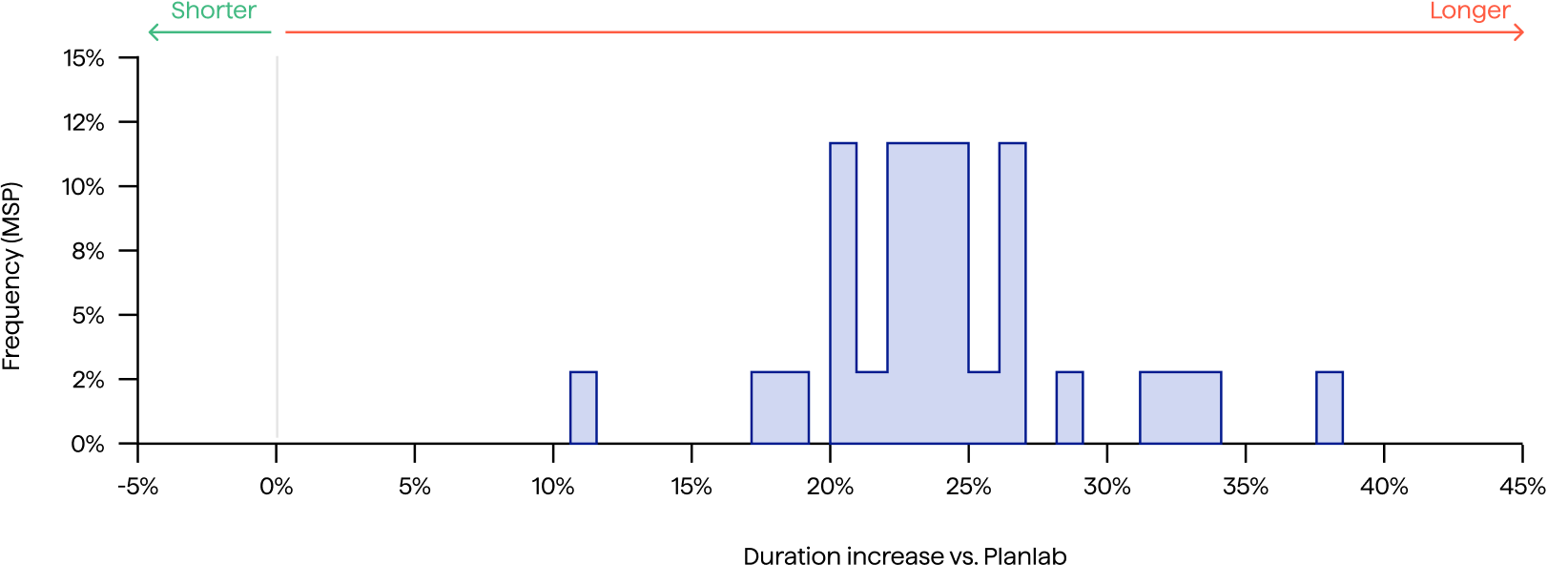


26%Longer duration vs Planlab
21%Longer duration vs Planlab
Simple integration into planning workflowOur platform is fully compatible with P6, and can read and write directly to XER files.




 Planlab

Create base schedule
Use your current schedule from P6, or create scenarios using Planlab’s Scheduling Agents
PlanlabAdd new constraints
We read in all the data from your XER file - here you can add additional constraints you can't put into P6, or you can skip this
Define target metric
By default, we will find the shortest duration schedule - if this is fine then skip this step, or set up the target you want
Optimize
Optimization can be a few seconds for small schedules, or minutes for very large and complex schedules
10x faster planning cyclesRe-plan in minutes: update rules instead of hand-crafting the answers
Optimize your plan 10-20%Schedule acceleration, cost reduction and delay penalty mitigation
Trusted by industry leaders







Book a callIn infrastructure or construction? We’d love to hear from you!
Book a call