
Introduction to Reverse Critical Paths and Lag-Drag
If you haven't heard of Drag, or want to freshen up your knowledge of it, please read our dedicated article on the subject.
When using the Critical Path Method to schedule complex projects, there is a subtle interaction between certain precedence relationship types and the way that the CPM method, as implemented in most Project Management software on the market, calculates the critical path.
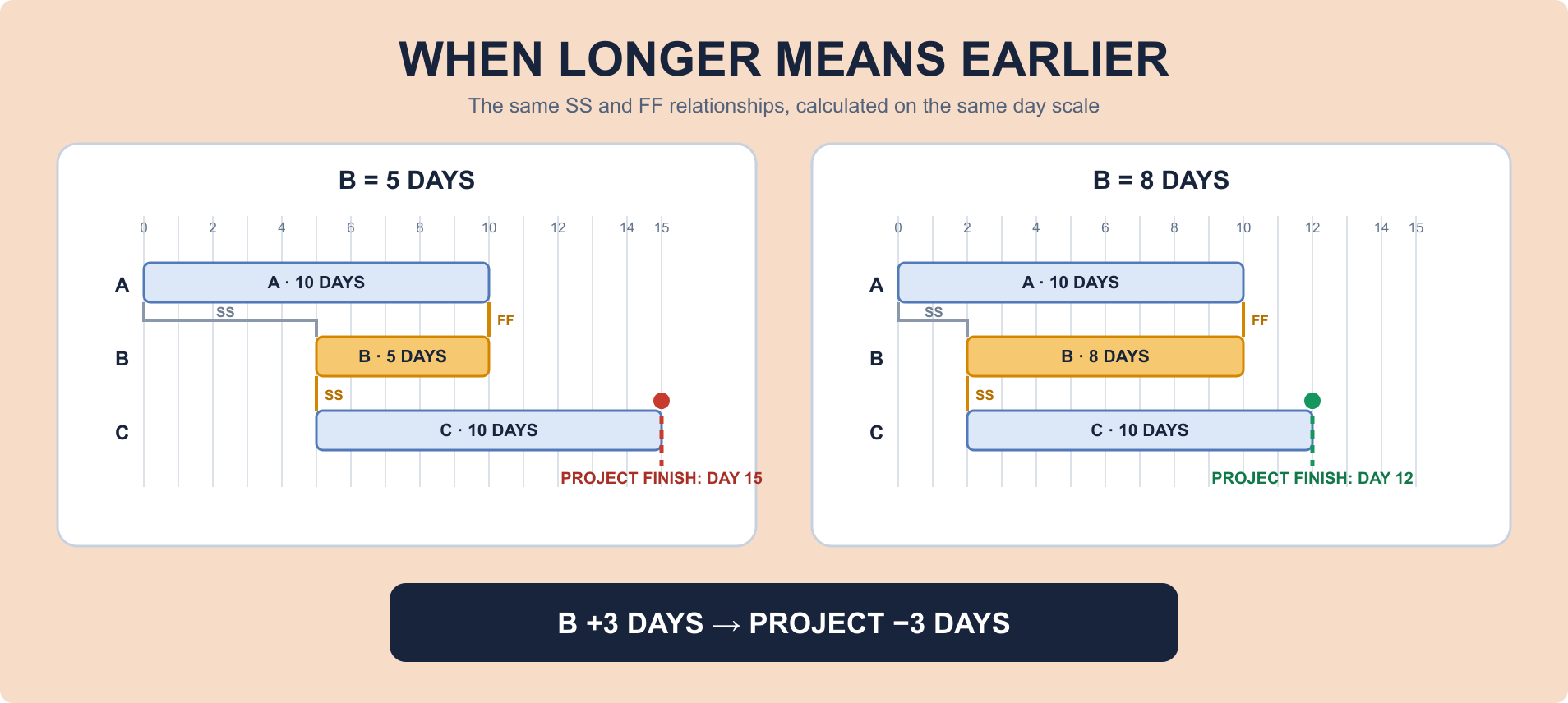
To understand why we should care about reverse critical paths (also known as the "lag-drag paradox"), let's look at the example schedule in Figure 1.
In this example, we have three activities, A, B, and C, with durations 10, 5, and 10 days respectively. There are start-start constraints between A → B as well as B → C, and a finish-finish constraint between A → B. The project start date is set to . The Critical Path Method iteratively schedules this project. A typical Critical Path Method implementation (for instance, the one in Primavera P6) takes the following steps:
- Schedule activity A to start at the project start time, . It therefore ends 10 days later.
- Schedule activity B:
- B has a start-start precedence relationship linking it to A, so it can only start when A starts. This means that B must start after the project start date.
- B has a finish-finish precedence relationship linking it to A, so it can only finish when A finishes. Given that B has an exact duration of 5 days1, it therefore must start on or after day 5.
- The start of B has two limits: it must start after day 0 and after day 5. Therefore, B must start on or after day 5.
- Schedule activity C. This is easy, since it is only constrained by a start-start precedence coming from B. We therefore conclude C at the earliest starts at day 5 and ends at day 15. This gives us a total project duration of 15 days.
The "drag" of an activity is its impact on the total project length. Intuitively, in most cases, activities can only make the critical path longer if they themselves take longer. However, in the case of the network shown above, the critical path gets shorter if we make B longer - this is the lag-drag paradox.
Lag-drag is a phenomenon in the critical path scheduling method as implemented in most modern project management software, where certain activities can shorten the critical path by becoming longer.
We can show that this is the case, by making Activity B longer, and obtaining a shorter schedule:
Why is this happening?
The reason that the critical path method behaves like this, is one of the steps from the computation shown previously. The driving constraint for the start date of B is not the start-start relationship linking it to A, but the finish-finish relationship linking it to A, combined with the duration on B itself. If B becomes longer, the finish-finish relationship with A becomes less important for determining its start date.
Once you can see an activity has lag-drag, it is easy to treat the problem. We can either make its duration longer (for instance, by putting fewer workers on it), or we can split it into chunks. The next sections show you how you can fix lag-drag issues in your schedule.
Fixing Lag-Drag by Increasing Activity Durations
As we demonstrated before, the lag-drag problem only happens because of the specific interaction between the precedence network and the exact duration of B. If we make B longer, the lag-drag goes away, and the makespan of the project is greatly reduced. Figure 3 has a demonstration of this behavior. Use the buttons below the Gantt chart to increase the duration of activity B, and you'll see the overall project makespan reduce as a consequence.
In practice, this is a good solution whenever making activity B longer is a sensible approach for your project schedule. For instance, this may be the case when B can be done at lower intensity, or with lower resource assignment, without significantly impacting the total cost to execute the activity. However, there are cases where this does not make sense, such as when B represents a concrete-pouring task, whose timing cannot easily be changed due to the chemistry of the task itself.
Fixing Lag-Drag by Splitting Activities
If increasing the duration of the lag-drag activity isn't an option, you can in some cases choose instead to split it up. The example in Figure 4 shows how this can impact the project schedule. Use the toggle beneath the schedule Gantt to split activity B into two chunks, and you can see the impact on the overall schedule from that split.
The split method is appropriate whenever B can physically be split, for instance because B consists of a number of sub-tasks which you originally hadn't detailed out in your schedule.
Summary
As you can see from this article, the correct handling of the lag-drag paradox depends on the physical reality of the activity that's causing it. If the activity can be economically and practically lengthened or split, the effect can be countered. If, however, the activity cannot be lengthened nor split, then the effect is physical - and the impact on makespan is real.
Understanding reverse critical paths is essential for anyone working with complex project schedules, especially those involving finish-finish or start-start relationships. By recognizing when lag-drag occurs and knowing the strategies to address it, you can create more accurate and optimized project schedules.
Related reading
- Critical Path Drag: Definition, Calculation, and Examples: how drag measures the time an activity adds to the project, including the negative-drag special case explored here.
- Critical path method: background on the scheduling calculation behind the examples.
1 This is an assumption made in most planning software. If you think this makes no sense, we'll explain in the rest of the article how we at Planlab deal with this assumption.