

The Challenge of Multiple Calendars
Many project schedules use calendars to manage resource and task timing. Calendars are used to indicate when work can make progress. For instance, certain work can only be done during certain times of day, certain crews have holiday periods, etc.
When the tasks along the critical path don't share the same calendar, it can be tricky to understand how changes in task duration impact the overall project duration.
A Practical Example
Imagine a simplified project where we'll be constructing earthworks. The first step is to put down a layer of sand, after which it must set for some period of time. The layering happens 9-5 Monday through Friday, but the setting of the sand happens 24/7.
What happens to the project duration if we are able to speed up putting down the sand by a day? Does the project get shortened by a day? By less? By more?
The Surprising Answer
It depends on the original task timing! If putting down sand was scheduled to start on Friday morning, take up the whole Friday, then proceed on the Monday and finish at 5PM (thus taking 2 working days of effort), and we sped up putting down sand by 1 working day, we would get a project that delivers 3 days early!
Further, it depends on how we measure project duration. In this example, it delivers 3 days early - but that is not necessarily how many working days it gets shortened by.
Computing Drag with Multiple Calendars
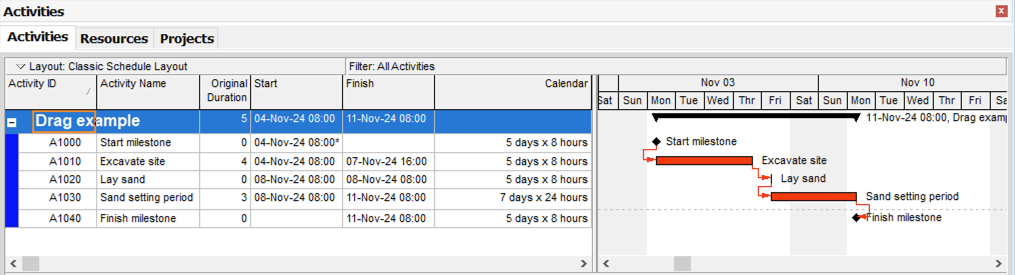
To understand the impact of an activity on project duration, we can compute its drag. We set the duration of "lay sand" to 0 and compare the overall project duration with the baseline case.
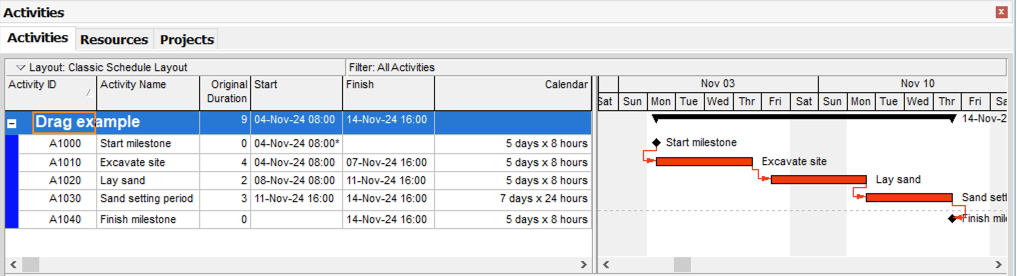
In this case, we see that by reducing the duration of "lay sand" by two days, the project completes at November 11th 08:00 instead of November 14th 16:00 - a difference of 4 working days!
Therefore, this activity, which lasts 2 working days, has a drag of 4 working days. The extra 2 days are "won" by getting the sand down before the weekend, and letting the setting process happen when other work can't be done.
Why This Matters
In such special cases, drag values can be longer than the activity duration itself, and this is due to the issue with multiple calendars being used along the project's critical path!
Drag is one of the most useful CPM schedule analytics tools, and as with all things scheduling, can behave unexpectedly when used on complex projects. Understanding how calendars interact with the critical path is essential for accurate schedule analysis.
Learn More
To learn more about drag and how to calculate it, read our article on Critical Path Drag: Definition, Calculation, and Examples.