Challenge 2: Adding Real-World Complexity


The Project
We are keeping the same fundamental setup as for Challenge 1: constructing a mining facility. It was great to see so many high-quality submissions, from a range of participants: highly experienced schedulers with decades of experience, to data scientists using fully algorithmic techniques.
Many of you who participated have suggested additions to the challenge. There are loads of suggestions, so Challenge 2 doesn't include all of them. I've introduced changes that represent some real-world complexity, but without making the fundamental problem much larger - in future challenges we'll introduce much larger schedules, with thousands more activities.
The Challenge
Overhead and Contractual Costs
There are now costs for keeping different parts of the site open, and for delivering late. This is to represent the overheads that are present for having more of the site open for work for longer.
- Project overheads: scales with overall duration of the project
- Zone 1 overheads: scales with the duration activities in Zone 1 are active
- Zone 2 overheads: scales with the duration activities in Zone 2 are active
- Contractual overruns: if delivery is after the contractual date, costs increase as you deliver later
Benefits
Instead of rolling everything into costs, there are now benefits as well as costs. For ease, they are expressed in the same way (via resources), so that benefits can also scale with the difference between the planned delivery date and the contractual requirement.
There is a fixed fee due on completion, and early-delivery benefits:
- Early benefit: if delivery is before the contractual date, benefit increases as you deliver earlier
- Completion fee: fixed fee paid after project completion
Resource Mobilisation and Idle Time
We are introducing resource idle time costs, alongside mobilisation costs. Instead of paying a mobilisation cost based on peak resource use:
- You pay a mobilisation cost each time you increase the number of resources you use
- You can choose to keep a resource on and not working if you want, to avoid paying the cost of mobilising again later
- Mobilisation cost is set to (40 hours × cost-per-hour) for each unit of a resource you mobilise, and applies to all Cost resources that are not Financial resources
An example of resource mobilisation and idle time is below, showing where a decision is made to retain resources (keep paying for them while they are idle), to avoid paying to re-mobilise the resource later.

Example showing 3 mobilisation events (01/01: 10 units, 06/01: 5 units, 27/01: 5 units) and one idle period (07/01-11/01 for 3 units)
Other Changes
- Calendars: there are now 2 calendars (8hr × 7day and 8hr × 5day)
- Activities: there are now zone-specific site setup activities
Decisions
The types of decision being made are the same:
Activity Modes
You can now select from 7 modes for all activities in scope. The combination of fraction and adjustment factor gives you a multiple to apply to the units-per-hour for resource assignments:
| Mode | Duration | Resources |
|---|---|---|
| Very slow | 2× duration | (1/2 × 100%) resources |
| Slow | 4/3 duration | (3/4 × 100%) resources |
| Standard | base duration | base resources |
| Fast | 2/3 duration | (3/2 × 120%) resources |
| Very fast | 1/2 duration | (2 × 140%) resources |
| Extremely fast | 2/5 duration | (5/2 × 200%) resources |
| Ludicrous mode | 1/3 duration | (3 × 300%) resources |
Resource Modes
You can use as many resources as you want, other than Tracker resources and Financial resources that must always have a limit of 1.
Valuing a Schedule
The value of a schedule is given by:
Benefits − (Activity costs + Tracker costs + Financial costs + Resource idle costs + Resource mobilisation costs)
Planlab Solution
This was a really interesting extension of the problem!
- You can activate Ludicrous-mode if the drag-cost of an activity really made it worth it to pay 3× for the resources
- Paying for idle time made smooth resource curves more important, making the balance between speed and efficiency lean slightly more toward the latter
Our Approach
Nothing like the classics - we kept the same algorithm, unchanged vs Competition 1. It's really important to keep things widely applicable. As a compromise I did run it for (quite a lot!) longer, just to see what'd happen.
Summary
Our schedule has a net value of £36,071,689 with the project completing on 2026-01-09 at 13:20.
| Component | Value |
|---|---|
| Mobilisation costs | −£21,125,333 |
| Activity costs | −£69,936,000 |
| Tracker costs | −£23,914,667 |
| Resource idle costs | −£2,685,644 |
| Financial costs | £0 |
| Total costs | −£117,661,644 |
| Activity benefits | £150,000,000 |
| Tracker benefits | £3,733,333 |
| Total benefits | £153,733,333 |
| Net value | £36,071,689 |
We have a small benefit of finishing early (contractual due date of 2026-02-02), but as a % of the total cost or benefit, it's small. The bulk of the value is coming from other places.
The Search
I let the algo run for 700,000 iterations, really to see if searching for a lot longer would help us find better solutions. This isn't a crazy run time, but not while-you-wait (unless you take a long time to make a cup of tea!)
In the chart below:
- "AIRL Standard" is simple resource levelling with all activities set to standard mode
- "CPM Standard" is the early-state solution from CPM with all activities set to standard mode (and lots of resource mobilisation to make it feasible)
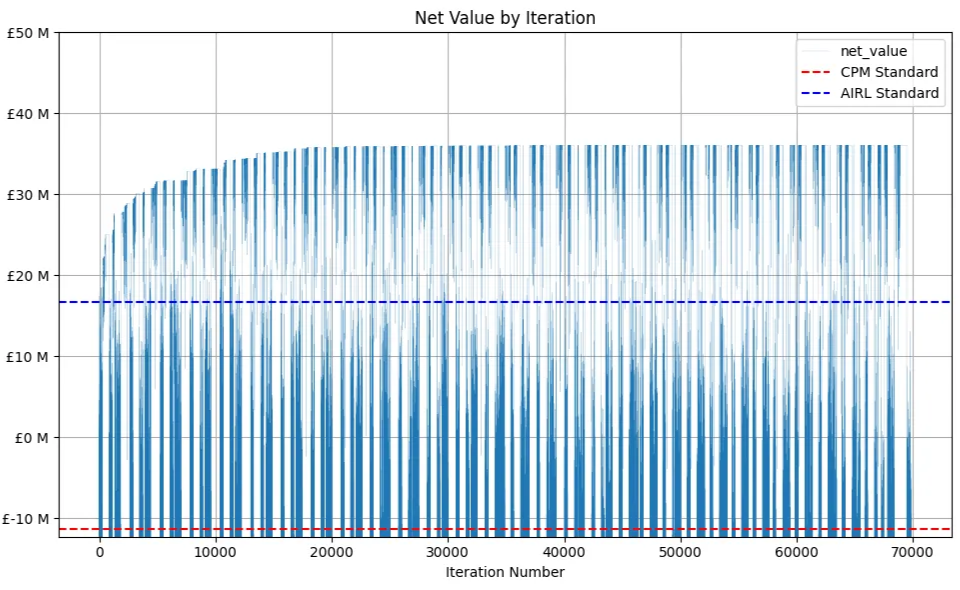
All iterations are shown; where net value is low is when the algorithm is trying options with more extreme settings (wide-search), then the algorithm picks the best ones and searches similar settings to make small improvements (local-search).
The extended run time really didn't yield any improvements:
- We very rapidly exceed resource-levelling with standard settings (this makes sense, as it's basically where we start!)
- We see steady improvement in the best solution until a bit under 200,000 iterations
- We basically flat-line after this, and while we are searching around a lot we just don't find anything that improves the solution.
Resource Use and Idle Time
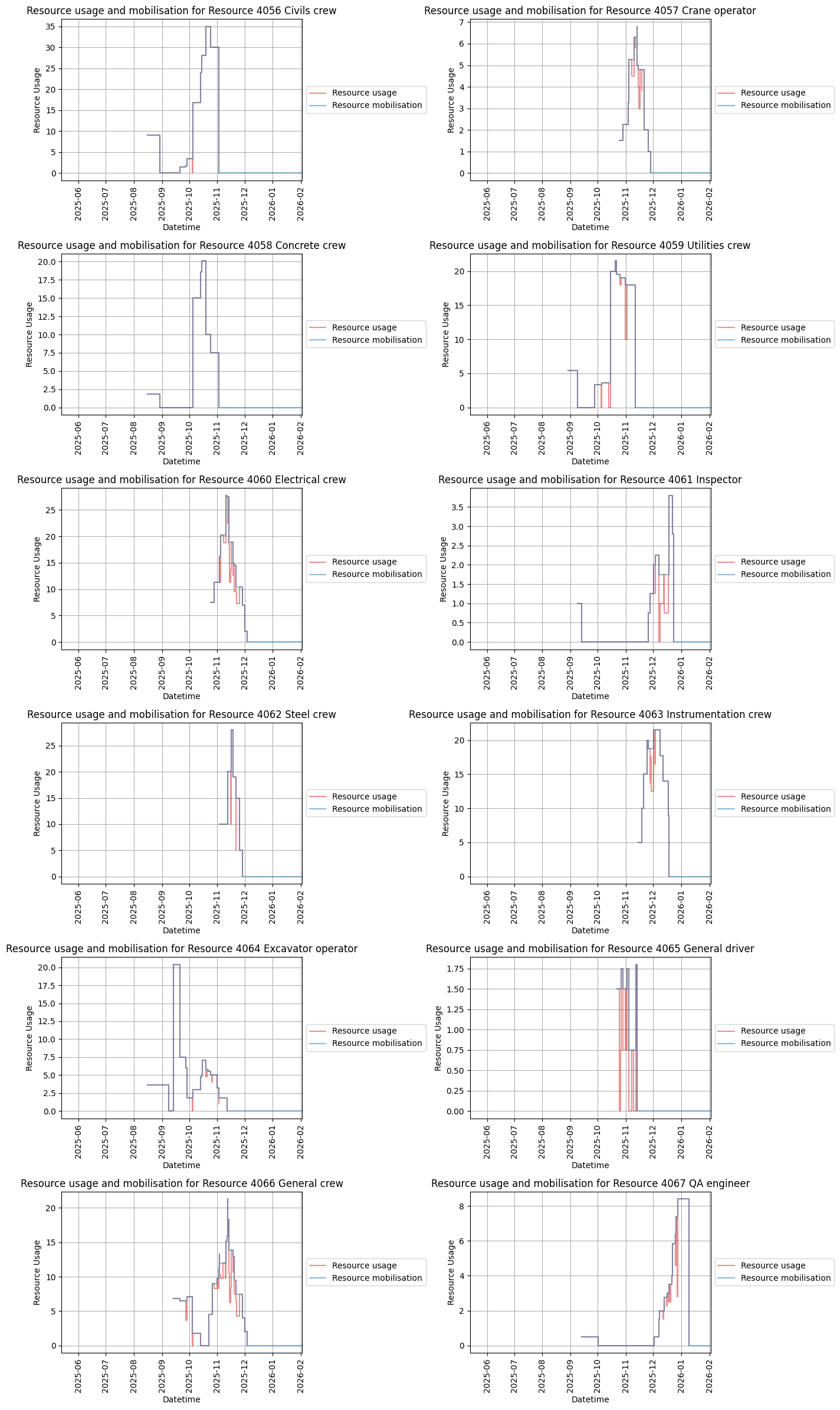
Looking at the resource plots, it actually looks like speed was more important than efficient resource use:
- A lot of resources have short periods of use, with high peak usage - this is very expensive for mobilisation costs. This is especially true for General Crew - this could be an opportunity to find a slightly better solution, or it could also be one of those times where ludicrous-mode was necessary due to the importance of getting an activity done asap.
- There isn't that much idle time, and where we do see it it's very concentrated. Some resources are on activities that are really important, and it's worth paying the cost of saw-tooth resource profiles.
Activity Modes
I expected to see at least a couple of ludicrous-modes! But it looks like the extreme cost of doing this (duration goes down to 1/3 of normal, but you need 9× the resources per hour..!) was never justified, and the most we saw was crashing activities to half their original duration. We do see quite a lot of this, and it is still expensive - this is where the acceleration was either critical for delivering early, or it allowed more efficient use of resources for later activities (or filled a gap where those resources would have been idle anyway).
The use of acceleration vs deceleration is remarkably balanced - almost suspiciously so!
| Activity Mode | Count | Share |
|---|---|---|
| +100% duration, −50% resources/hr | 15 | 15% |
| +33% duration, −25% resources/hr | 22 | 21% |
| +0% duration, +0% resources/hr | 35 | 34% |
| −33% duration, +80% resources/hr | 19 | 18% |
| −50% duration, +180% resources/hr | 22 | 12% |
| −60% duration, +400% resources/hr | 0 | 0% |
| −67% duration, +800% resources/hr | 0 | 0% |
Given what we see in the resource use profiles, I disaggregated this by resource-use to see if there were any resources that tended to be on accelerated activities:
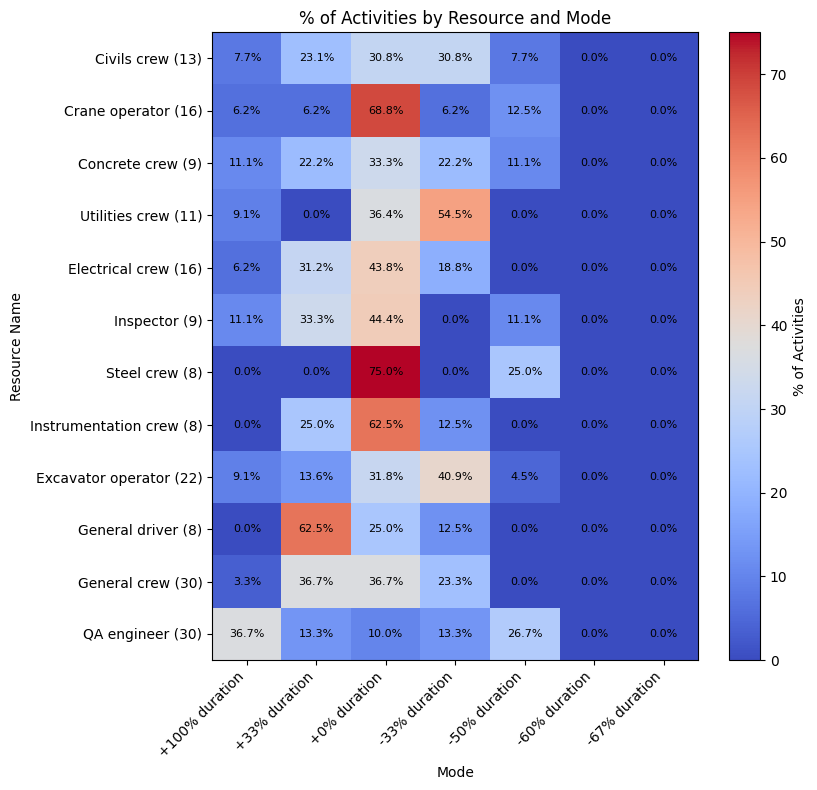
There are some really interesting patterns in here:
- QA engineers have a lot of deceleration (+100% duration), and also acceleration (−50% duration). This will have the effect of smoothing peak resource use while delivering schedule compression, where there are activities with float running in parallel to those without.
- There's a bias towards acceleration on Excavator Operators and Utilities Crews - activities with these resources are early on in the build sequence for each work package, and these activities are commonly quite long.